
2 year warranty


Curved Business MonitorMonitor lengkung SuperWide 32:9 dengan USB-C
49B2U5900CH/69
Menyempurnakan produktivitas alur kerja
seri 5000
49 (48,8" / 124 cm diag.)
5120 x 1440 (Dual QHD)
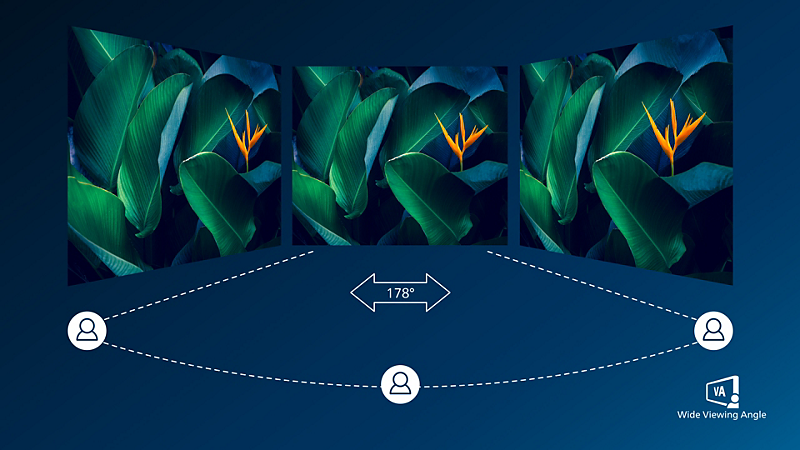
Layar VA menghadirkan gambar yang dahsyat dengan sudut pandang lebar
Layar LED VA Philips menggunakan teknologi penyesuaian vertikal multi-domain yang ditingkatkan yang memberikan Anda rasio kontras statis super tinggi untuk gambar ekstra jelas dan terang. Dengan pengaplikasian kantor standar yang mudah, khususnya cocok untuk foto, penelusuran web, film, game, dan aplikasi grafis yang sulit. Dengan teknologi manajemen piksel yang dioptimalkan memberikan sudut pandang ekstra luas 178/178 derajat, sehingga menghasilkan gambar yang sangat jernih.

DisplayHDR 400 untuk visual yang lebih hidup dan luar biasa
DisplayHDR 400 bersertifikat VESA menghadirkan peningkatan signifikan dari layar SDR normal. Tidak seperti layar ‘kompatibel dengan HDR’ lainnya, DisplayHDR 400 yang sebenarnya menghasilkan kecerahan, kontras, dan warna yang menakjubkan. Dengan global dimming dan kecerahan minimum 400 nit, gambar tampak nyata dengan highlight yang menawan serta menampilkan warna hitam yang lebih pekat dan bernuansa. Hal ini menghasilkan palet warna baru yang lebih kaya untuk menghadirkan pengalaman visual yang imersif.

Koneksi RJ45 melalui USB-C untuk akses jaringan yang mudah dan aman
Sederhanakan semua periferal dari monitor ke PC menggunakan konektor USB Tipe-C docking satu kabel, termasuk untuk jaringan, output video resolusi tinggi dari PC ke monitor, dan berselancar di internet tanpa kabel jaringan tambahan, bahkan tanpa port LAN di notebook Anda. Koneksi RJ45 melalui USB-C menawarkan akses yang cepat dan aman saat dibutuhkan. Dengan kecepatan data tertinggi, Anda dapat mentransfer data dari HDD ke PC lebih cepat dari sebelumnya. Selain itu, USB-C dengan penyaluran daya bahkan memungkinkan Anda menyalakan dan mengisi daya notebook dari monitor sehingga tidak memerlukan kabel daya tambahan.
Spesifikasi Teknis
Penghargaan


Ulasan
3.0
dari 5
1
Ulasan
THEunbeleiver
07/07/2026

Australia
great but WRONG MANUAL at Philips
Great device. Essential to read the manual to adjust power settings to dock. but No Use Manual in the box. the website has the wrong one (I checked UK US AU and NZ websites for the correct English manual. no luck). Philips email support is discontinued in Australia but is listed as a channel on their site. They replied by email to say so... Their service numbers are for subcontracted repairers with contracts. So it took a week to get a link for the right PDF from a local repairer.. Essential info is needed form the manual to get this going. you need to turn the USB setting to "standby mode" so your laptop will charging and work in docking mode, and you may need to reboot for the supposedly plug and play drivers to install and fully work , or you wont get sound. Sound is light and tinny - like a laptop - but good separation. 3 days web searching for a manual. or info... I registered the product here on philips.com.au. I still cant get the manuals. Or a way to contact Philips about this issue. Hard to use it fully or be sure if I need drivers. Or to know if the ones on your site are up to date if the manual isn't even right (!). That right, no paper USER MANUAL INCLUDED in the box. And the correct one is NOT available for download online on philips.com.au or NZ or HK when selecting English or English (US). I only want to download the manual from the Philips site as the non reputable secondary sites aren't trustworthy. I have the 49B2U5900CH_75 . Unfortunately the support page links to a totally wrong PDF on the Australian NZ and HK sites...yes I kept trying different sites and languages too) So in desperation, I read the FRENCH version to find out how to power up the USB C ports so it would charge my laptop (TIP: set USB standby mode to ON, and set USB setting to high resolution to enable max resolution and 75htz refresh rate). I am connected via USB C but there is no audio and I have selected both the Philips audio devices (windows 11) to no avail... next I will need to install some drivers... but this is meant to be a UPNP device. The quick start manual is VERY MINIMAL (not text, just tiny pictures) and wholly insufficient. There seems to no user forums. or help pages. or way to contact Philips support easily. Great product, poor TINY Quick Start Guide, and so many features but no information how to make the most of a great product, or get the resolution and layouts right . I will have to find dedicated nerd videos on YouTube I suppose. I am a tech head who is an early adaptor and uses ALL the features of high end products and is even sent appliances for review. I wont be raving about this one. Tip for Philips - make a Video for users (for something OTHER than the cool KVM feature).. and put a red X on the quick start guide so its clearer what NOT to do when taking it out of the box... not a triangle which is unclear. fortunately I was careful and got it right - attaching the stand FIRST after picking it up by the STRAPS.
Keunggulan
beautiful and large and expensive and feature packed high end stuff
Kekurangan
1. poor (very small) Quick Start Guide. is should be A4 or A3. - especially considering the large amount of TINY DETAIL you need to see int he illustrations to know which ports to connect - there is high complexity in choosing a docking station setup.
Ulasan ini dibuat untuk Curved Business Monitor 49B2U5900CH 32:9 SuperWide curved monitor with USB-C
Date of Use 2026-07-03
Ulasan ini dibuat untuk Curved Business Monitor 49B2U5900CH 32:9 SuperWide curved monitor with USB-C
Date of Use 2026-07-03
Daftar sekarang & dapatkan Welcome Voucher DISKON 20%
- Penawaran khusus member.
- Akses lebih awal ke promo.
- Info produk terbaru & tips hidup sehat.
- Penawaran khusus member.
- Akses lebih awal ke promo.
- Info produk terbaru & tips hidup sehat.
Radius busur kurvatur layar dalam mm
Nilai waktu respons sama dengan SmartResponse
Area sRGB berdasarkan CIE1931, Area NTSC berdasarkan CIE1976.
Aktivitas seperti berbagi layar, streaming video dan audio online melalui Internet dapat memengaruhi kinerja jaringan. Perangkat keras, bandwidth jaringan, dan kinerjanya akan menentukan kualitas audio dan video secara keseluruhan.
Untuk fungsi daya dan pengisian daya USB-C, Notebook/perangkat Anda harus mendukung spesifikasi Power Delivery standar USB-C. Lihat panduan pengguna Notebook atau tanyakan kepada produsennya untuk keterangan selengkapnya.
Jika koneksi Ethernet terasa lambat, silakan masuk ke menu OSD dan pilih USB 3.0 atau versi yang lebih tinggi yang dapat mendukung kecepatan LAN hingga 1G.
Untuk transmisi Video via USB-C, Notebook/perangkat Anda harus mendukung mode Alt DP USB-C
Daya yang disalurkan melalui USB-C dari layar ini dapat mencapai 100 W (umumnya 96 W). Penyaluran daya maksimum bergantung pada perangkat Anda.
Peringkat EPEAT hanya berlaku di mana Philips mendaftarkan produk. Harap kunjungi https://www.epeat.net/ untuk status pendaftaran di negara Anda.
RJ45 mendukung PXE (Preboot eXecution Environment), MAC Address Pass-Through (MAPT), dan Wake on LAN (WOL) pada sistem yang kompatibel. Dukungan dapat berbeda-beda, tergantung pada konfigurasi sistem.
Ketika menghitung penghematan biaya listrik dari PowerSensor, baik USB maupun penyaluran daya tidak termasuk.
Monitor mungkin tampak berbeda dari gambar.